Skip to content
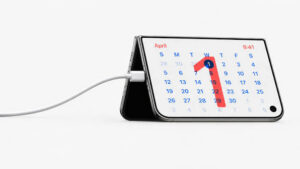
Apple has announced another wave of phones and devices for your home and your personal life, and it seems pretty clear they are pushing the iPhone Duo to be the central nervous system of the house. That matters to us here, because Wires R Us wires homes in development and construction as well as homes looking at smart home upgrades, and this lands squarely in that territory.
One of the first questions we get is whether it is actually practical to charge your phone straight from the USB-C outlets we install in your home. More importantly, can those outlets support the fastest charging Apple is advertising? And can they go further and replace the giant brick that comes with a laptop needing 96W or 140W?
This post walks through it. The short answer is yes. There are outlets on the market that install into your home and support phone fast charging. Laptop fast charging is a different story, and right now it is quite difficult to achieve from anything in the wall. With all that said, we would still call this one of the more worthwhile upgrades you can make. It future proofs the house, and it makes the place feel a little more premium and a little more thought through.
The short answer
Phones: yes. A high-output USB-C receptacle can hit the fastest charging speed the current iPhones support, as long as the cable is rated for it too.
Laptops: no, at least not at full speed. Every current MacBook, including the lightest MacBook Air, needs more power to fast charge than any in-wall receptacle on the market can deliver. It will still charge. It will just charge slowly.
The part that surprises people: plug a second device into the same receptacle and the first one usually stops fast charging.
Can a wall outlet fast charge an iPhone?
It can, and this is the case where the technology in the wall has genuinely caught up to the device.
The important thing to understand is that fast charging is a negotiation between three parts: the power source, the cable, and the device. All three have to support the speed. The weakest one sets the pace. A high-output receptacle paired with a cheap cable gives you the speed of the cheap cable, which is usually why people think their new outlet is broken when it is working exactly as designed.
What the iPhone Duo needs specifically
Apple’s published specifications are unusually clear on this, so it is worth reading them literally. For the iPhone Duo, Apple lists up to 50 percent charge in around 20 minutes using a 60W-capable adapter or higher paired with a USB-C charging cable, and up to 50 percent in around 30 minutes using a 35W adapter or higher paired with a MagSafe charger. Wireless charging over MagSafe or Qi2 tops out at 25W.
Two details matter for anyone deciding what to wire in:
- Apple specifies that wired fast charging requires a 60W-capable or higher USB-C cable in addition to the power adapter. The cable carries a rating, and a lot of the cables sitting in kitchen drawers do not meet it.
- The box contains the phone and a one meter USB-C charge cable. There is no power adapter in it at all. Whatever supplies the power, whether that is a wall brick or a receptacle, is something the owner has to provide.
That second point is the whole reason this question comes up in home design conversations now. The charger is no longer a thing that arrives with the phone.
Can you charge a MacBook from a wall outlet without the brick?
You can charge one. You cannot fast charge one. The gap is not close, and it is not a matter of buying a better receptacle, because the receptacle market does not go that high.
Apple publishes the exact power adapter combinations required for fast charging on each machine:
| Machine | Adapters that fast charge it |
|---|---|
| MacBook Air (2022 or later) | 140W, 96W, 70W, or 67W (67W on 13.6-inch models only) |
| 14-inch MacBook Pro (2021 or later) | 140W or 96W |
| 16-inch MacBook Pro (2021 or later) | 140W |
Those figures come straight from Apple’s own fast charge documentation, which describes fast charging as reaching roughly 50 percent battery in around 30 minutes.
Now set that against what a wall receptacle can actually put out, covered in the next section. The lowest figure in that table is 67W. The highest figure available in an in-wall device is 65W. The MacBook Air misses the threshold by two watts, and the 16-inch MacBook Pro misses it by 75.
What this means in practice. A USB-C receptacle at a desk or a kitchen counter will keep a laptop topped off and will charge it overnight without complaint. If you are leaving the house in twenty minutes and you need the battery to move, the brick that came with the machine is still faster, and nothing wired into the wall is going to change that.
How many watts is a USB wall outlet actually?
In-wall USB charging receptacles are generally sold in a few output tiers. The low tier handles phones at ordinary speed and is fine for a nightstand where the device sits for eight hours. The middle tier covers fast phone charging and tablets. The top tier, which currently sits around 60W to 65W on a single port according to manufacturer specifications, is the one marketed for laptops, and it is the one where the claims run ahead of the reality for anything larger than a very light machine.
A rough way to think about the tiers:
- Around 15W: a phone will charge. It will not fast charge. Fine where the device sits for hours.
- Around 30W: fast charging for most phones, and enough for tablets. The practical sweet spot for bedrooms and most rooms in a house.
- Around 60W to 65W: the ceiling. Fast charges current iPhones including the Duo, keeps a laptop alive, does not fast charge a laptop.
Higher output also means more electronics packed into the same device and the same box. That is a practical consideration during installation rather than a reason to avoid them, and it is worth raising with your electrician rather than discovering it after the drywall is closed.
The catch nobody prints on the front of the box
This is the detail that changes where these receptacles are worth putting, and it is buried in the fine print rather than on the packaging.
The advertised output is usually the figure for one device. At least one manufacturer publishes the breakdown openly: a 65W unit delivers 65W to a single port, drops to 30W each when two ports are in use, and 20W each across three.
So the receptacle you installed on the nightstand to fast charge a phone stops fast charging that phone the moment a second phone goes in next to it. On a nightstand shared by two people, which is the single most common place homeowners ask for these, the top tier device spends most of its life running at half output.
That is not a reason to skip them. It is a reason to think about how many devices land at each location before choosing the output, because two well placed mid-tier receptacles often serve a room better than one expensive high-output receptacle everyone is fighting over.
Charging spec calculator
Pick the devices that charge at one location, set how many USB ports that location has, and this works out the output you need. It gives you a spec to hand your builder or designer, rather than a shopping list.
Devices charging at this location
Where these belong in a new build
The reason we would rather talk about this before a house is framed than after it is finished is simple. Adding or changing a receptacle during new construction electrical wiring is a small item on a rough-in. Adding one to a finished wall is a different job with a different price, and the difference is entirely about when you asked.
The locations worth thinking about, and what we ask homeowners when the plans are on the table:
- Nightstands. How many devices per side. This is where the shared port derate decides the output tier.
- Kitchen counter and island. Where phones actually land, which is rarely where people first guess.
- Home office or desk wall. Where the laptop lives, and where the honest conversation about laptop charging speed needs to happen before anyone spends money expecting the brick to disappear.
- Entryway or drop zone. Often more useful than a bedroom for the household that charges everything in one spot.
The same conversation covers everything else that is cheap at rough-in and expensive later, including EV charger wiring, 240V garage circuits, and conduit for whatever goes in the shop later. Walking the full plan set room by room is how those decisions get made before a selections budget is already spent.
Who picks the actual device
We do not tell homeowners which brand or model to buy, and we do not carry a preferred one. Device and fixture selection sits with the homeowner and the builder or designer running the project. What we do is explain what each output tier will and will not do, wire it correctly, and make sure the circuit behind it is right for what is being asked of it.
If you tell us the plan calls for a high-output USB-C receptacle at the island, that is what goes in. If you tell us the goal is charging a laptop at that island without a brick, we will tell you the numbers above first, because we would rather have that conversation before the order than after.
So where does this leave you
After all the breakdown and the estimating, the real question is simple. Is it genuinely a good idea to move the outlets in your home over to USB-C, and does that mean you can live throughout the house without grabbing a charging brick every time?
We think yes. For your phone and the devices you use every day, this moves the bricks into that drawer you open once every six months. You rely cleanly on the cords instead, rather than keeping separate bricks scattered around the house, or running out to your bag or your vehicle to find the one that went missing.
The laptop brick stays, for the reasons above. Nearly everything else can go in the drawer.
Planning a build or a remodel?
Bring the plans in and we will walk them room by room, including where charging actually happens in your house. Get in touch with our team and we will get the conversation started.
Sources. Charging figures for the iPhone Duo are from Apple’s published iPhone Duo technical specifications. MacBook fast charging adapter requirements are from Apple’s support documentation, Fast charge your MacBook Air or MacBook Pro. Receptacle output tiers and shared port behavior are from published manufacturer specifications. The calculator applies one manufacturer’s published port sharing figures as a worked example, and sharing behavior varies between units. Figures current as of publication and subject to change by the manufacturers.